want expert advice on your website? get in touch for a free website audit
book your free website audit



Instagram SEO in 2026: The Full Playbook
July 19, 2026
Okay, let’s talk about the thing everyone name-drops, and almost nobody actually explains: Instagram SEO. If you’re posting content into the void and hoping the right people find it, this is the post that changes that. Grab a coffee, this one’s a proper deep-dive.
(Side note: I say “grab a coffee” and I genuinely mean it. I wrote most of this on my third flat white of the day, which probably explains why the hashtag section got a little heated. More on that later.)
What Instagram SEO Actually Is
Here’s the whole concept in one sentence: Instagram SEO is optimising your profile and content so Instagram understands what your account is about, and shows it to the people already searching for exactly that.
That’s it. Everything else in this guide is just me unpacking that one idea.
Instagram SEO is what helps to increase your visibility and engagement on the platform. It grants you easy access to the main Explore page and gets your posts seen by the people you’re trying to reach.
And you probably already know this, but the algorithm is constantly changing. You load up the app and see a bunch of new updates that change how you get your posts seen. It can feel like you’re always trying to “figure it out” all over again just to stay visible – almost like you’re playing catch-up just to stay visible.
But here’s the good news: While there are a bunch of nuances that come into play with becoming a master of Instagram SEO, there are clear strategies you can use that consistently help push your content in front of the right audience. However, one thing to keep in mind is that there isn’t a one-size-fits-all approach. But there are definitely “do this, and you’ll thank me later” tactics.
Multiple Algorithms
Here’s the bit most guides skip: Instagram doesn’t run one algorithm. It runs four separate systems. One each for Feed, Reels, Stories and Explore:
- Feed – This is all about prioritising people you actually interact with, weighing your relationship and past behaviour more than raw discovery
- Reels – Built for entertainment and reach, this is the one doing the heavy lifting for getting you in front of strangers
- Stories – Leans hardest on recency and relationship strength; it’s not really trying to find you new fans
- Explore – Surfaces new content based on interests and what similar users engage with; this is your discovery engine
Four systems, four different jobs, four different sets of signals they’re each weighing. So when people talk about “beating the algorithm,” they’re really talking about feeding four different systems.
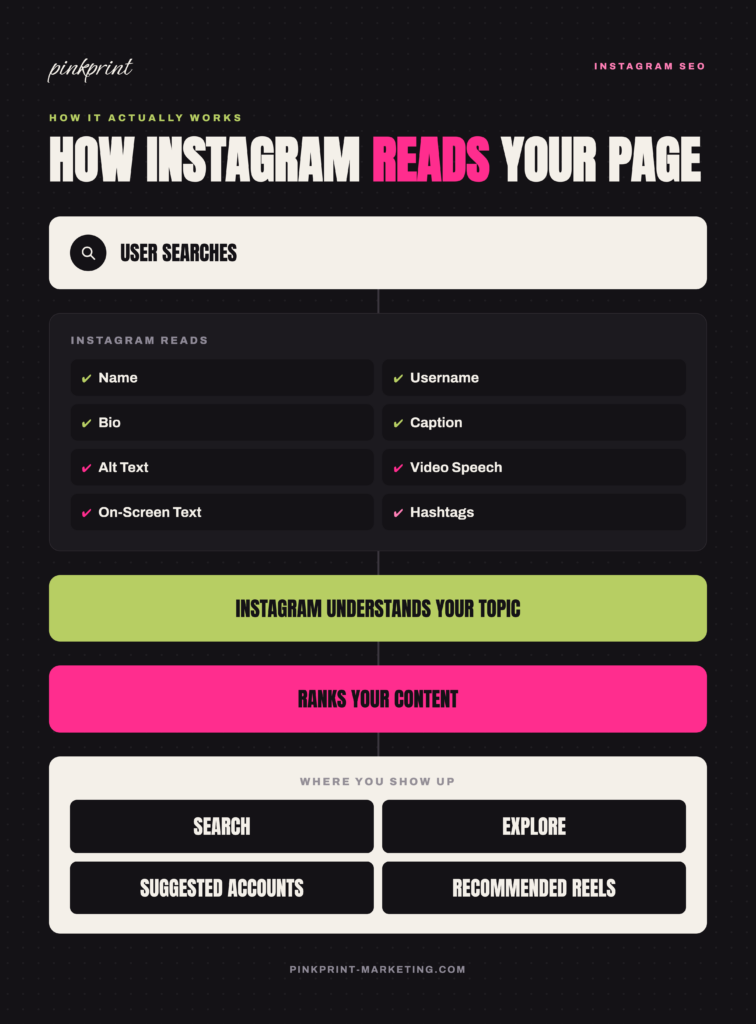
One quick visual before we go step by step:
Wait, Where Does Suggested Accounts Fit In?
Quick thing I want to clear up before you move on. You’ll notice Suggested Accounts shows up in the diagram as one of the four places your content can land, but it didn’t get its own entry in the four systems above. That’s not an oversight.
Suggested Accounts aren’t running on its own separate ranking logic. It’s pulling from the same signals as Explore, interests, similar-user behaviour, that kind of thing. It’s just found in a different spot in the app.
So when you’re optimising for Explore, you’re already doing the work for Suggested Accounts too. One less thing to separately obsess over.
How Instagram “Understands” You in the First Place
How does Instagram know what your content is even about?
Machine learning. Running quietly in the background. Doing way more homework on you than you’d ever guess.
To set the scene, it’ll be good to picture Instagram as that one friend who remembers EVERYTHING. Your images, your text, your audio, how people engage, your whole account behaviour. Instagram’s systems analyse your images, your text, your audio, how people engage with you, your whole account behaviour. Then it takes all of that, files you into a category, and that category decides who gets to see you.
And here’s the bit that most leaves out: Instagram has confirmed its AI watches your visuals and listens to your spoken audio too. Not just captions and hashtags. So what you’re actually saying and showing on camera? It counts. Properly counts. Not just the words you typed underneath. Which is exactly why Instagram SEO matters more than it ever has.
One key thing I need you to remember: this isn’t a post-by-post thing. It’s cumulative. Instagram gets to know your account slowly, over time, exactly the way a new friend gets to know you. Show up consistently talking about small business marketing, and it gets more and more confident recommending you to anyone who’s into that topic. That’s topical authority, and it’s a huge part of why I bang on about consistency so much.
You may also like: What is Topical Authority in SEO!
And look, the second I say “topic” like that, I can feel some of you tensing up. I hear this fear from clients constantly, so let’s put it to bed once and for all. Niching down does not make you boring. I’ve had people genuinely panic that picking one lane means no more beach photos, no more random Sunday thoughts, personality officially cancelled. I promise that is not what this is! It just means your core content has a clear centre of gravity. You can still post the beach photo. You can still be a full person online. Instagram just shouldn’t have to guess what you’re actually there for.
Instagram’s “Your Algorithm” Feature – How Users Can Now Control What They See
Okay, lean in, because this one’s big, and it’s recent enough that most accounts haven’t adjusted their strategy for it yet. Instagram rolled out a feature called “Your Algorithm”, which passes off direct control to its users. Users now have the ability to control what Instagram thinks they’re interested in. It started with Reels at the end of 2025, crept into Explore in the spring, and by mid-2026 it’s live across the main feed too.
In practice? People can now open up the list of topics Instagram has assigned them and edit it themselves. More of this, please. Absolutely none of that, thanks. Delightful if you’re a user. But something worth keeping in mind for your account.
Your content now needs to match topics your audience has actively chosen. If what you post doesn’t line up with what someone’s told Instagram they want, you’re less likely to show up for them. Even if your content is genuinely brilliant. Harsh? A little. But it’s exactly why staying tightly on-topic (more on that later) matters even more now than it did a year ago.
How Instagram Search Actually Reads Your Content
When someone searches a term, Instagram is working through a hierarchy of signals to figure out what you’re actually about:
- Name field
- Username
- Bio
- Captions
- Alt text
- On-screen text (yes, Instagram reads text baked into your images and videos)
- Spoken words in your videos
- Hashtags
- Engagement signals
That list is your mental model for the rest of this guide. Every tactic below maps back to one or more of those nine points.
Instagram SEO vs. Traditional SEO
Let’s go back to basics. Instagram SEO is very similar to traditional SEO. However, instead of ranking on search engine results pages (SERPs), you’re ranking on Instagram. Same underlying logic as Google SEO, completely different playing field. The ranking factors:
- Correct profile setup
- Posting genuinely relevant content
- User activity
- Engagement signals
- Strategic captions
- Format choice (Reels, Stories, carousels)
Getting Your Profile Right
Before you even touch your content strategy, your first priority should be your profile setup.
Name and Username
Your name field (the bold text under your handle) does far more SEO heavy lifting than your username. It’s what shows up prominently in search results, so it’s where your primary keyword needs to live.
Content writer named Tiffani? “Tiffani | Content Writer” tells anyone searching exactly who you are, instantly. “Tiffani” alone tells them nothing. Same person, wildly different discoverability.
Your name field is a nice second slot for your primary keyword too, if you can make it work, usually your industry or service.
Bio
Next up, your bio.
Think of your bio like a meta description. It’s a quick summary that helps both Instagram and potential followers understand who you are and what you do.
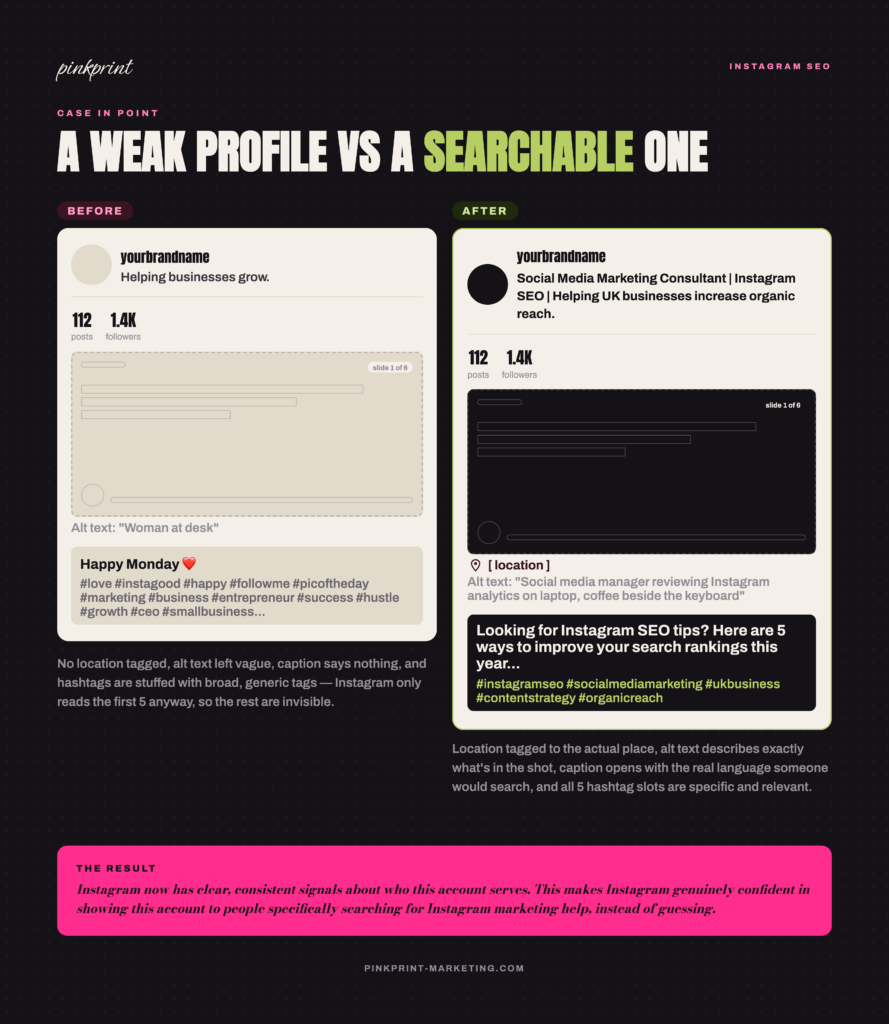
A quick before-and-after:
Weak: “Helping businesses grow.”
Strong: “Social Media Marketing Consultant | Instagram SEO | Helping UK businesses increase organic reach.”
See it? The second one tells Instagram (and a human mid-scroll) exactly who this account serves, what niche and how. That’s the level of specificity you want. Making this change makes Instagram genuinely confident in showing this account to people specifically searching for Instagram marketing help, instead of guessing.
If writing a bio isn’t your thing (and honestly, most people I know would rather do anything else), an AI bio generator can get you a solid starting point. Just go back in afterwards and add your actual personality, or it’s going to sound like a robot wrote it, because technically, one did. A few worth trying:
- Hootsuite’s Instagram Bio Generator – Free and gives you multiple polished options instantly
- Canva Magic Write – Handy if you’re already building your profile visuals there, draft the copy right next to the mockup
- Copy.ai – Has a dedicated Instagram bio template where you can set the tone: witty, bold, warm, whatever fits you
Location
Local business or influencer? Adding your location to your bio is genuinely an underrated move, and it’s one of those five-second edits that just sits there quietly working for you.
Why does this matter? When someone searches “hair salon Manchester” or “wedding photographer near me,” Instagram is factoring location into that search the same way it factors in your keywords. It’s not just the bio field either. Here are a few other places you can drop location info, roughly in order of “how easy is this to actually do”:
- Your business address. If you have an actual shopfront or office, add it properly through your professional dashboard (that’s the setting in your account). This is what lets Instagram show you on the map and in “near me” searches.
- Tag your location on every post and Reel. Instead of just tagging the city, tag the actual place, the café, the studio, the neighbourhood. So “Northern Quarter, Manchester” tells Instagram more than “Manchester” does on its own.
- Use the location sticker in Stories. Same idea as tagging posts, just for Stories. Easy to forget, worth building into the habit.
One thing worth knowing: this isn’t just for shopfronts. If you’re an influencer or a service-based business who works with a specific region (even if you never see clients in person), tagging your general area still helps Instagram understand who your realistic audience is, which matters for the same reason niching down topically does. Instagram wants context, and “where” is context.
Alt Text (Yes, Actually Fill This In)
Alt text gets mentioned constantly and explained rarely, so here it is properly. It’s a short written description of your image, built for accessibility (it’s what screen readers use). Instagram also reads that description to understand what’s in your image, which makes it a genuine SEO opportunity.
Here’s what most people don’t know. Instagram auto-generates alt text for every photo you post, whether you touch it or not. Except that version is vague. Think “photo may contain: person, outdoor, text.” That tells Instagram basically nothing. Writing your own is how you actually get credit for what’s in the shot.
Where to find it: when you’re uploading, tap “Advanced settings,” then “Accessibility.” You’ll see a spot to write custom alt text for each image, one at a time if you’re posting a carousel.
Weak: “Woman at desk”
Strong: “Social media manager reviewing Instagram analytics on laptop, coffee beside the keyboard”
See it? The second one actually tells Instagram something. Who’s there, what they’re doing, what’s around them. That’s the context that helps your content land in the right searches instead of a vague, algorithmic shrug.
A couple of rules I’d stick to:
- Describe what’s actually there; don’t keyword-stuff it. “Content creator filming a Reel, ring light, phone on a tripod” works. Cramming “content creator marketing Instagram tips social media growth 2026” into one line just reads as spam, and it’s genuinely unhelpful for anyone actually using a screen reader.
- Keep it natural. Same instinct as writing a good caption, just shorter.
- Do it every time, not just for the posts you’re proud of. Ten seconds, tops. It’s one of the lowest-effort wins in this whole guide, and I’d bet money it’s the section you’re most tempted to skip. Don’t.
Captions: Where Most People Get It Wrong
“Add keywords to your captions” means nothing without an example, so here’s one.
Weak: “Happy Monday ❤️”
Strong: “Looking for Instagram SEO tips? Here are five ways to improve your Instagram search rankings this year…”
The second version tells Instagram (and the reader) exactly what the post is about, in the actual language someone would search. Instagram Search now reads caption language much the way a traditional search engine reads a webpage, so write naturally, but include the real words your audience would type.
Stop cramming keywords in. You don’t need five awkward mentions shoved into your caption; you need one clean, natural one near the start. That’s it. That’s the whole move.
Not sure what’s actually landing? Skip the guessing. Pop into Instagram Insights and look at which posts are reaching non-followers; that’s your real signal to know what’s actually working versus what just feels right.
Hashtags: What Changed (And It’s a Big One)
Okay, this section needed a full rewrite. The advice you’ve probably read elsewhere is straight-up outdated.
For years, everyone said the same thing: you get up to 30 hashtags, so use all 30. Meanwhile, Instagram’s own Adam Mosseri had been quietly saying hashtags work more like topic labels for the algorithm than an actual discovery channel. The smart recommendation had already shifted down to three to five. Most people just weren’t listening yet.
Then late 2025 happened. Instagram made it official: five hashtags per post and Reel, full stop. The 30-tag era is over. It’s an enforced limit now. Some scheduling tools will still let you type in more (they haven’t updated their backend), but Instagram’s app and its ranking system only see the first five. Everything after that is invisible.
So what does this actually mean for you?
Weak hashtags: #love #happy #followme (and 27 more just like them)
Strong hashtags: Five specific, genuinely relevant tags that describe exactly what this post is about and who it’s for.
Generic tags like #love or #instagood carry close to zero discovery value now. They’re too broad to tell the algorithm anything useful, and when you’ve only got five slots, every single one has to count. Stop thinking of hashtags as a numbers game. Start thinking of them as category labels.
And hashtags were never the main event anyway. Your caption is. Hootsuite ran the numbers and found keyword-rich captions consistently beating hashtag-heavy posts on both reach and engagement. The five-tag cap didn’t make that happen. It just forced everyone to finally admit it.
Finding Keywords People Actually Search
What’s the actual difference between a keyword nobody searches and one that gets you found? Specificity. Let me show you what that looks like in practice.
Say you’re a fitness influencer. You know your niche, you know your audience, but when it comes to picking keywords, you default to the obvious one because it feels like the “biggest” word for what you do.
Too broad: “Fitness”
Actually searchable:
- Home workouts
- Women’s strength training
- Weight loss tips
- Pilates for beginners
- Running coach
“Fitness” sounds right, but it’s competing against millions of accounts and telling Instagram almost nothing specific about you. “Women’s strength training” or “Pilates for beginners” does the opposite. It doesn’t get you lost competing with the big names.
Broad terms carry too much competition and too little intent. Specific terms match exactly what someone’s looking for right now.
Where to actually find them:
- Instagram’s own search bar. Start typing your general topic and watch what autocompletes. That’s real search behaviour, straight from the source.
- Google Trends. Good for spotting rising interest and seasonal patterns in your niche.
- AnswerThePublic looks at the actual questions people ask around a topic.
- Competitor research. Look at the language similar accounts use in their bios and captions. If it’s working for them, there’s a decent chance it’s a term with real search volume behind it.
Reels SEO: It Gets Its Own Spotlight for a Reason
You know the Reels I’m talking about, the ones where you’re three seconds in, you have no idea what’s happening, but you can’t look away because something in your gut just refuses to let you scroll past, and by the time you realise you’ve watched it twice, you already know it’s not an accident. That’s Instagram’s Reels algorithm in action, doing exactly what it’s built to do, and it’s judging your video on a completely different set of signals than it judges a static post.
Here’s how it works:
- Audio – what’s actually being said in your video
- On-screen text and subtitles – including OCR, meaning Instagram can genuinely read burned-in captions and text overlays
- Captions – the written description accompanying the post
- Watch time – how long people stay, and whether they rewatch
- Sends – how often people DM your Reel to someone else
Watch time is widely considered the strongest ranking signal for Reels, and the first few seconds are doing almost all the heavy lifting for whether someone keeps watching. Sends come in right behind it. Think about what a DM share actually means: someone made an active choice to pass your content along instead of just scrolling past it. That’s one of the strongest endorsements you can get.
So practically? Hook attention immediately. Add subtitles (most people are watching with the sound off, and subtitles double as an SEO signal). And build something genuinely worth sending to a friend.
One more flag worth raising: Reels with visible watermarks from other platforms get deprioritised. Yes, that means your reposted TikToks.
Look, we’ve all reposted a TikTok in a pinch. No judgment. But if that’s a regular habit and not an occasional shortcut, Instagram can tell, and it’ll treat you accordingly.
Carousels Deserve Their Own Mention Too
It seems like Reels gets all the hype. But don’t sleep on carousels. And they’re genuinely worth building into your rotation of posts.
Don’t get me wrong. Reels are incredible for getting in front of new people. But if you’re only posting videos because everyone says “Instagram only cares about Reels now”, you’re leaving a huge opportunity on the table.
Carousels are how you build trust with your existing audience.
Think about your own scrolling habits. How many times have you swiped through a carousel thinking, “I’ll just look at the first slide,” only to end up reading the whole thing? Then you hit save because you’ll definitely need it later. Or you send it to a friend with “This is literally what I was trying to explain.” That’s exactly the behaviour Instagram wants more of.
Instagram’s algorithms aren’t looking for vanity metrics, such as likes anymore. It’s looking for the engagement that matters. Did someone stop scrolling? Did they keep swiping? Did they save it? Did they send it to someone else?
Every swipe tells Instagram, “Keep going, they’re interested.”
Every save says, “This is worth coming back to.”
Every share says, “Other people need to see this too.”
There’s another reason I love carousels that doesn’t get talked about enough: search.
Every single slide gives you another chance to naturally include the words and phrases your audience is already searching for. Instead of relying on one caption to do all the work, you’ve suddenly got multiple opportunities to reinforce your topic.
Let’s say you’re creating a carousel about growing on Instagram. One slide could cover consistency. Another could talk about engagement. Another might explain hashtags. Another could break down content planning. You’re naturally covering related search terms without stuffing awkward keywords into your caption.
Not All Engagement Is Equal
You’ll hear people say, “Just focus on engagement.” Cool… but what does that actually mean? Because not every interaction tells Instagram the same thing.
| Signal | Priority | Why it matters |
| DM shares (sends) | Very high | Someone thought your content was valuable enough to put their own name behind it by sending it to someone else. That’s a huge signal. |
| Saves | High | This tells Instagram your content has lasting value, not just something someone glanced at for two seconds before scrolling away. |
| Watch time | Very high | Especially for Reels, keeping people watching tells Instagram your content is holding attention, which is exactly what it wants to see. |
| Comments | Medium | Conversations matter. A thoughtful comment shows real interest, but quality beats quantity here. |
| Likes | Low | Nice to have? Absolutely. But compared to saves, shares and watch time, likes don’t carry the same weight they used to. |
How Often Should You Actually Post?
Honestly, there’s no one-size-fits-all strategy to this.
Instagram’s own guidance has moved towards more frequent posting. Start posting daily-ish across formats and watch what your account can sustain without the quality dropping, then adjust from there. What actually matters more than hitting an exact quota is that Instagram can see a consistently active account. Sporadic bursts followed by silence hurt visibility more than a slightly lower but steady rhythm.
And can we normalise saying this out loud: posting daily is genuinely a lot. If a sustainable cadence for you is four solid posts a week instead of seven mediocre ones, take the four.
Stay in Your Lane (Topically, At Least)
Can you post about dogs one day, marketing the next, and coffee after that, all on the same account?
Technically, sure. Strategically, it works against you.
Imagine you’ve finally landed a meeting with your dream client. They sit down, ready to talk business. Instead, you spend five minutes showing them photos of your dog, then tell them about your coffee run from this morning, then randomly start talking about SEO.
They’re probably thinking, “…are we ever getting to the point?”
Instagram reacts the same way.
The algorithm is trying to work out what your account is actually about. And now that people can tell Instagram what they want to see more (or less) of, sending mixed signals makes that job even harder.
Sticking to a clear niche, even a reasonably broad one, helps Instagram build that topical authority we talked about earlier and get genuinely confident about which searches and interests you belong in.
Instagram SEO Quick Round-Up
Instagram SEO Mistakes to Avoid
- Keyword stuffing – Cramming keywords into every sentence makes your content harder to read, and Instagram is smart enough to spot it too.
- Irrelevant hashtags – You’ve only got five hashtags to play with now, so make each one count. If your hashtags don’t match your content, you’re just confusing the algorithm.
- Buying followers – A big follower count looks nice until nobody interacts with your content. Low engagement is a much bigger red flag than having a smaller audience that’s actually interested in what you post.
- Blurry or low-quality video – If people scroll away because they can’t properly see what they’re watching, your watch time takes a hit before your content even has a chance.
- Watermarks from other platforms – Reposting your TikToks with the watermark still on? Instagram isn’t a fan, and your reach probably won’t be either.
- Inconsistent posting – You don’t need to post three times a day. You do need to show up consistently. A steady posting schedule tells Instagram your account is active and ready to deliver content.
Your Instagram SEO Workflow
Here’s what to actually do with everything above:
- Choose one primary keyword for your account.
- Optimise your name field around it.
- Rewrite your bio with specific, niche-relevant language.
- Add natural keywords to your captions, near the start.
- Write descriptive alt text on your images.
- Use five relevant, specific hashtags max, no more, they won’t even register beyond that now.
- Include your keywords in Reel speech and subtitles.
- Post consistently and sustainably. Don’t sprint and burn out.
- Check the topics Your Algorithm has assigned your ideal audience, and make sure your content actually matches them.
- Create content genuinely worth saving or sending, not just liking.
- Review your Instagram Insights monthly and adjust based on what’s actually working.
Here’s what your profile should look like at the end:
Instagram SEO FAQ
Do emojis affect SEO?
Not in any directly measurable way, but they affect readability and tone, which indirectly influences engagement.
Should I use keywords in Stories?
It won’t hurt, and it keeps you consistent across every surface, but Stories are generally weighted more toward relationship and recency signals than search discovery.
Do Reels rank better than static posts?
For pure discovery among non-followers, generally yes, Reels are Instagram’s primary discovery format right now. For deepening relationships with existing followers, feed posts and carousels still hold their own.
Does deleting posts hurt SEO?
There’s no strong evidence that deleting old posts directly damages your account’s standing, but it does remove any engagement history and keyword signals that your post was contributing.
Should captions be long or short?
Long enough to be genuinely useful and keyword-relevant, short enough to stay readable. Clarity over length, always.
How long does Instagram SEO take to show results?
No fixed timeline. It depends on your posting consistency, competition in your niche, and how quickly you implement these changes. Expect weeks, not days, before you see a meaningful change.
