want expert advice on your website? get in touch for a free website audit
book your free website audit


How to Use WhatsApp for Marketing in 2026
October 7, 2026
Quick question. When did you last leave a WhatsApp on read for three days? (Don’t answer that. I’ve seen your group chats.)
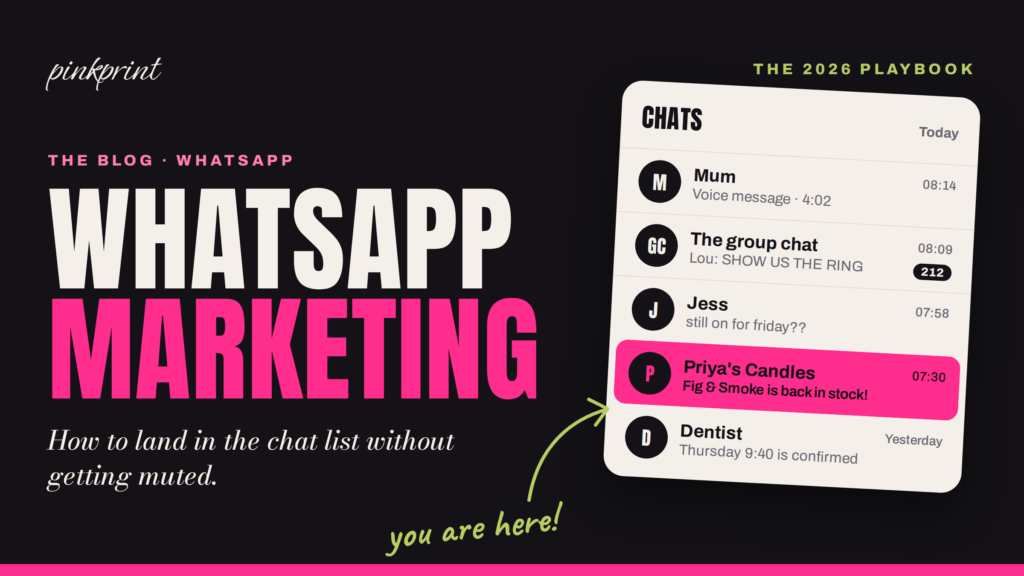
Now open WhatsApp and look at your chat list. Go on, I’ll wait.
There’s your mum, with a four-minute voice note. The group chat, 212 unread, because someone got engaged and someone else sent a blurry photo of the ring. There’s your best mate asking if you’re still on for Friday. And finally your dentist confirming Thursday at 9:40.
Mum. The group chat. Your best mate. Your dentist. And right there, tucked between them, a brand you actually like, telling you the thing you wanted is back in stock.
WhatsApp puts your business between someone’s mum and their best mate.
That one sentence holds the whole opportunity and the whole risk. No other channel gets you that close. Email drops you into a promotions tab next to 400 other brands shouting about 20% off. Instagram makes you compete with every creator on earth. WhatsApp puts you in the same list as the people your customer loves most, and it hands them a mute button for anyone who doesn’t behave like it.
So here’s the plan for today: why WhatsApp works (with real numbers, including why one famous stat is nonsense), the benefits that actually matter, the app versus the platform, what it actually costs now that Meta has shaken up the pricing again, how to build a list without upsetting the ICO, what to send, how often to send it, the ads and AI bits, a nosy look at how Jellycat does it, and a 30-day launch plan. Then an FAQ, obviously.
Why WhatsApp Works for Marketing in 2026
Brands are queueing for that spot in the chat list for a very good reason: everyone’s already in there.
In the UK, Ofcom’s Online Nation 2025 report found that 90% of online adults used WhatsApp in May 2025, and 74% of them (about 36.1 million people) opened it every single day, up from 64% a year earlier. Your customers check it before they’ve even got out of bed.
Now follow the money. Meta’s “other revenue” line, which it says comes mainly from WhatsApp paid messaging and subscriptions, crossed $1 billion in a single quarter for the first time in Q2 2026, up 73% on the year before. Businesses don’t hand Meta a billion dollars a quarter for a channel that flops.
The 98% Open Rate Myth
Quick detour, because this one’s been living rent-free in my head for months.
Almost every WhatsApp marketing tool’s homepage says the same thing: a 98% open rate! Some throw in a 45% to 60% click rate for good measure. Go looking for where that 98% comes from and you’ll find… other blog posts quoting it. Then other blog posts quoting those. It’s a rumour wearing a lanyard.
Chatarmin, a WhatsApp marketing platform, actually published its numbers: 382 brands, 49.3 million campaign messages, a full year of data. Their open rate (read receipts divided by delivered messages) came out at 79.6% across all messages, and 72% for the median brand. Clicks landed at 12% of delivered messages, and 0.34% of messages triggered an opt-out. They go as far as calling the 98% figure a myth, which I love.
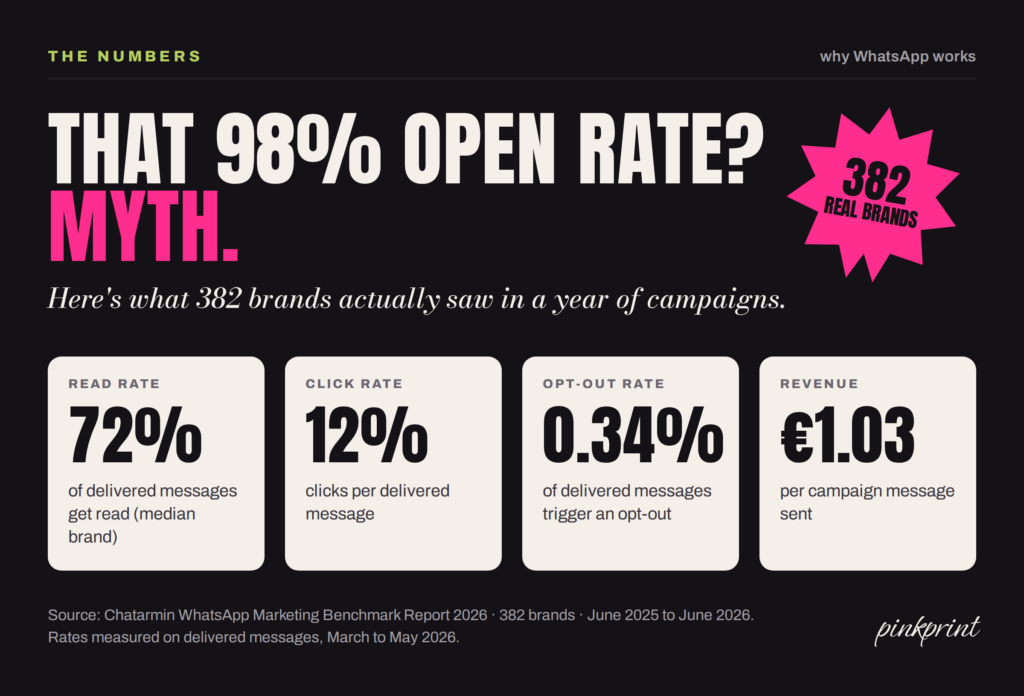
Now, 72% is still wild. A decent email campaign would sell a kidney for that. And across the year, Chatarmin’s brands made about €1.03 in attributed revenue for every campaign message they sent. (Two caveats: the data covers Chatarmin’s own customers rather than the whole market, and their attribution counts some chat activity, which can flatter the channel. Still, it beats a made-up number.)
So WhatsApp works brilliantly. It just doesn’t work magically. Plan around 70-ish%, and treat anyone promising 98% the way you’d treat a dating profile that says “six foot, loves travel.”
Benefits of WhatsApp Marketing
Okay, so everyone’s on it and people actually read it. Brilliant. But “lots of people use it” isn’t a strategy, so let’s talk about what WhatsApp does for your business that your other channels can’t.
On WhatsApp, a customer can hear about it, ask about it and buy it without ever leaving the chat.
That’s the whole magic trick. Here’s how it breaks down.
People Actually Read Your Messages
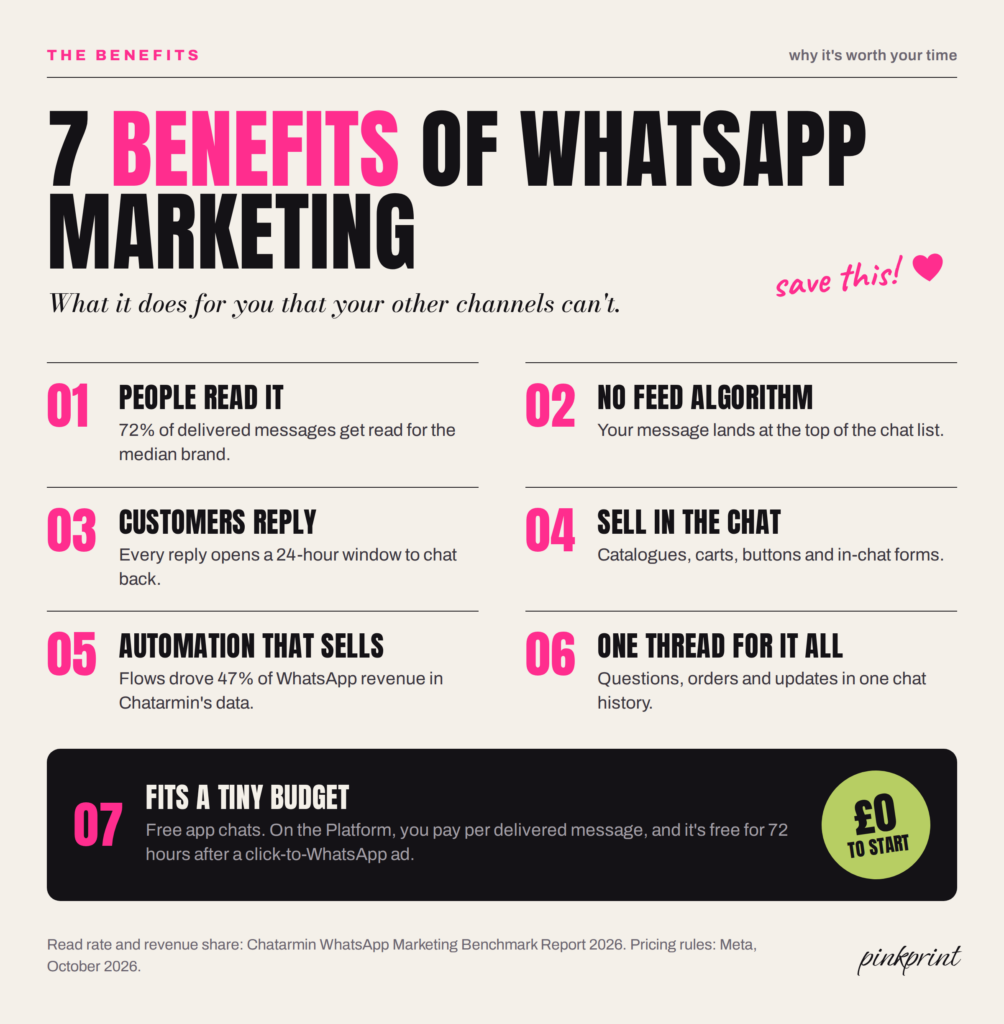
We just did the numbers: Chatarmin’s brands averaged a 79.6% open rate, which they reckon is roughly three and a half times a good email campaign, and even the median brand got 72% of its messages read. Your email newsletter is fighting the promotions tab. Your WhatsApp is sitting in the chat list they check before they’ve even brushed their teeth.
There’s No Feed Algorithm Burying You
Post on Instagram and the algorithm decides who sees it (spoiler: fewer people than you’d like). WhatsApp’s chat list just sorts by the newest message. Your message lands, and it sits at the top until something newer arrives (well, under their pinned chats, and you’re not beating Mum to a pin). Meta does cap how many marketing messages each person gets, which I’ll come back to, but nobody’s ranking you underneath a video of a cat falling off a sofa.
Customers Can Reply (and They Do)
Email is a megaphone. WhatsApp is a phone call you can take on the bus. Customers reply with questions, photos, voice notes and “omg yes”, and every reply opens a 24-hour window where you can chat back properly. That back-and-forth is where the sale happens, and it’s where you learn what your customers actually want, straight from them.
You Can Sell Without Sending People Anywhere
Every time you send someone to a website, you lose a few of them on the way. WhatsApp lets you skip the trip. The Business app gives you a catalogue and a cart, so customers can browse and send you an order as one message. On the Platform, you get buttons, product carousels and WhatsApp Flows, which are little forms that open inside the chat for sign-ups, bookings and quotes.
Automation Keeps Selling While You Sleep
Abandoned basket nudges, welcome messages and win-backs can run on their own once you’ve built them. In Chatarmin’s data, these automated flows brought in almost half of all WhatsApp revenue (I’ll show you the exact numbers in a sec). You set them up once, and they keep working at 2am while you’re asleep or, let’s be honest, still scrolling.
Service and Sales Live in One Thread
The order confirmation, the “where’s my parcel?”, the sizing question and the next purchase all sit in the same chat. Your customer scrolls up and sees the whole relationship. You don’t have to dig through three inboxes to remember who they are. Jellycat has built its whole WhatsApp approach around this side of things, and I’ll get nosy about that later.
It Fits a Tiny Budget
The Business app is free for one-to-one chats, and its broadcasts come with a free monthly allowance. On the Platform, Meta only charges when a message reaches someone’s phone, not when you hit send, and messages are free for 72 hours after someone taps a click-to-WhatsApp ad and you reply. You can start with £0 and a phone, and only pay more once it’s working.
Now, the catch (there’s always a catch). Every single one of these benefits disappears the second you act like spam. People mute, block and report, and you lose your spot between Mum and the best mate. Keep that in your back pocket for the rest of this post.
WhatsApp Business App vs. WhatsApp Business Platform
Before you send a single message, you need to pick your set-up, and this is where most small businesses muddle things up. There are two WhatsApps for business, and they do different jobs.
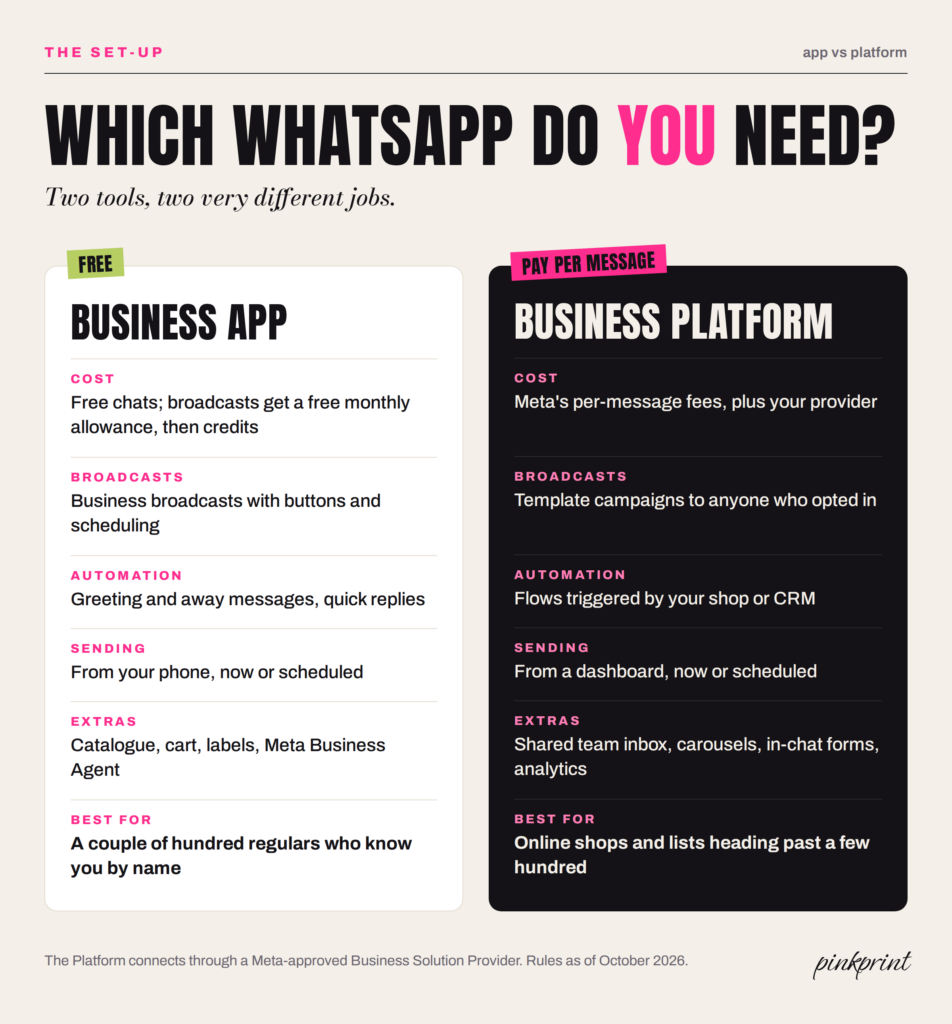
The WhatsApp Business App
This is the free app you download on your phone. Here’s what you get:
- A business profile
- A product catalogue
- Labels to sort your chats
- Quick replies for the questions you answer forty times a day
- Greeting and away messages.
Meta is also rolling out its Business Agent in the app, an AI assistant that answers customer questions for you. It’s free to start, and Meta says paid subscriptions are on the way.
The catch is broadcasting. The old broadcast lists capped you at 256 contacts and only reached people who’d saved your number. Meta has since rolled out business broadcasts, which can reach customers who haven’t saved you, with buttons, scheduling and basic insights. The new limit is money: you get a free monthly allowance of broadcast messages, and once it runs out, you buy message credits. The allowance varies by country, so check yours in the app. For a hairdresser with 150 regulars who all know her as “Jess Hair 💇♀️”, that’s plenty. For a Shopify store with 4,000 customers and a basket that needs chasing every hour, it’s a lot of tapping.
The WhatsApp Business Platform
The Platform (you’ll still hear people call it “the API”) is the grown-up version. You access it through a Business Solution Provider, one of the software companies Meta approves to connect businesses to WhatsApp, and it plugs into your shop, your CRM or your helpdesk.
You get automated flows that fire when someone does something on your site (abandoned basket, order updates, win-backs), a shared inbox for your team, buttons, carousels, integrations and proper analytics. When you message someone first, you have to use a template Meta has approved, and Meta puts each template in a category that sets the price. (More on that in a sec.)
Which One Do You Need?
My rule of thumb: if your customers mostly know you by name, you’ve got under a couple of hundred of them, and you’re happy running campaigns from your phone, start with the app. It’s free, and it’ll teach you what your customers actually reply to.
If you sell online, want messages that fire automatically when someone does something on your site, or your list is heading past a few hundred, go straight to the Platform. You can switch later, but it’s admin you’ll wish you’d skipped.
How Much Does WhatsApp Marketing Cost in 2026?
The app is free for one-to-one chats, and broadcasts come with a free monthly allowance before you need credits. Lovely. Let’s talk about the Platform, because Meta has been busy with its pricing this year, and another change lands on 1 October 2026. (Is anyone else tired? I’m tired.)
Meta charges per delivered message, based on two things: the message category and the country of the person receiving it. Here’s the UK picture:
- Marketing messages (offers, launches, basket reminders): Meta raised the UK rate on 1 July 2026, and trackers reading Meta’s rate card put it at $0.0635 a message. Call it roughly 5p.
- Utility messages (order confirmations, delivery updates, appointment reminders): about $0.022, so around 1.5p to 2p.
- Service messages (your replies when a customer messages you first): free until now. From 1 October 2026, Meta charges for these too, at the same rate as utility. Utility templates you send inside that 24-hour reply window lose their free pass on the same date. Some providers report that the first 1,000 service messages per number each month stay free, so check with yours.
- Messages after a click-to-WhatsApp ad: when someone taps an ad and messages you, and you reply within 24 hours, everything you send for the next 72 hours costs nothing, marketing included. Meta has confirmed that window survives the October changes.
Then your provider adds its own fees on top: a monthly subscription, a small markup per message, or both.
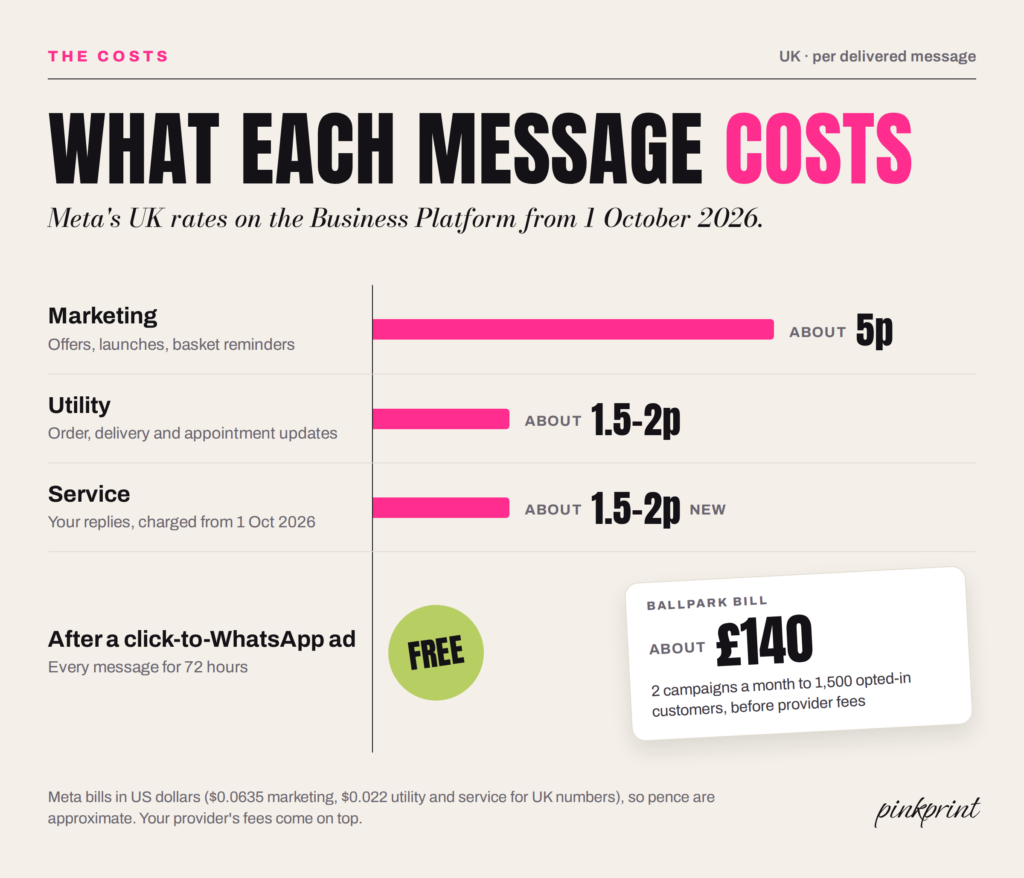
So what does that look like for a real small business? Say you’ve got 1,500 opted-in customers and send two campaigns a month. That’s 3,000 marketing messages at roughly 5p, so somewhere around £140 to £150. Add a few hundred abandoned-basket reminders, your delivery updates and your replies, and you’re probably looking at about £200 a month in Meta fees, plus your provider. Put that next to Chatarmin’s €1.03 per campaign message and you can see why brands keep paying up.
One practical tip now that replies cost money: stop triple-texting. “Ok!” “Perfect” “👍” used to be free. From October, that’s three charges. Write one proper reply instead. Your customers will prefer it anyway.
How to Build a WhatsApp Marketing List Legally
Okay, the list. This bit makes or breaks everything, so I’m going to nag a little. Sorry. Not sorry.
Consent Comes First
The ICO applies PECR’s “electronic mail” rules to WhatsApp, the same rules that cover your marketing emails and texts. Its guidance spells out that the rules reach direct messages and any similar message people receive electronically. So you need either clear consent or the “soft opt-in” (existing customers, similar products, with a chance to opt out when you collected their details and in every message after).
And the stakes went up this year. Since 5 February 2026, the Data (Use and Access) Act has let the ICO fine PECR breaches up to £17.5 million or 4% of global turnover, where the old ceiling sat at £500,000. Even under the old ceiling, the ICO fined Papa John’s £10,000 in 2021 over more than 168,000 marketing messages that customers hadn’t properly agreed to. That was texts and emails from a pizza chain. WhatsApp won’t get a softer ride.
Meta has its own rule on top: its business messaging policy requires opt-in before you message people. Skip it and people block and report you, your quality rating drops, and Meta can limit or ban your number.
What Good Opt-In Looks Like
Your consent needs to name WhatsApp specifically, make it clear that you’re the one messaging, and sit separately from your terms and conditions. A pre-ticked box doesn’t count. Neither does “we might message you” buried in paragraph nine of your privacy policy.
Here are the opt-in spots I’d set up first:
- Checkout: an unticked box that says something like “Send me drops and offers on WhatsApp (1 to 2 a month, reply STOP any time).” Telling people how often you’ll message makes the tick feel safe.
- Click-to-WhatsApp ads: the customer messages you first, so you’ve already got a conversation going. Use it to ask if they’d like updates, with a yes/no button.
- QR codes: on packaging, receipts, your till, your salon mirror. Point them at a wa.me link with a pre-filled message like “Hi! Add me to the VIP list.”
- Your website and Instagram bio: a WhatsApp button with a clear reason to join, like early access or a members-only drop.
- A welcome offer: 10% off for joining does the job. Early access is a nice alternative if you’d rather not train people to wait for discounts.
What I’d never do: upload your whole customer list and blast everyone because “they gave us their number.” They gave you their number for delivery updates. Different thing entirely.
(Side note, because I see this one all the time: if a customer messages you to ask where their parcel is, that’s a service chat. It doesn’t put them on your promo list. Ask them instead. It takes one button.)
Make Leaving Easy
Put an opt-out in every marketing message (a “Stop promotions” button or “reply STOP” both work) and honour it straight away. Someone leaving your list costs you one contact. Someone blocking and reporting you chips away at your quality rating, and with it, your reach to everyone else.
What to Send on WhatsApp: Messages That Actually Work
Let’s meet Priya. She runs a small candle brand from a unit in Bristol, sells mostly through Shopify, and has 1,200 people on her WhatsApp list. Here’s what she sends, and why each message earns its spot between Mum and the group chat.
Start off with welcome message that sets expectations
Within a minute of someone opting in, they hear who she is, what they’ll get (new scents first, one or two messages a month) and how to leave. Then the 10% code. Clear expectations make the next message feel invited instead of random.
Abandoned basket reminders
This is the money-maker. Someone leaves the Fig & Smoke candle in their basket, and an hour later they get a friendly nudge with a photo and a button straight back to checkout. In Chatarmin’s data, automated flows like this brought in €2.48 for every contact who entered one, and nearly half (47%) of all WhatsApp revenue, without anyone pressing send. (Keep it to one or two reminders. Three is clingy.)
Drops and back-in-stock alerts
Priya’s bestseller sells out every autumn. When it comes back, her VIPs hear first, 24 hours before her email list. People who asked to know get told. It’s the easiest message in marketing to get right.
Order and delivery updates
These are utility messages, so they cost less than marketing ones, and they train people to open your messages. Don’t sneak a discount code into them, though. Meta reviews template categories and can move promotional ones into marketing, at marketing prices.
Real conversations
Priya’s customers message her asking which scent suits a small bathroom, or whether the jars are recyclable. She answers, sends a photo from her catalogue, and the order often happens right there in the chat. Each reply now costs a penny or two, which is a bargain for a sale.
Win-backs
Customers who haven’t ordered in four months get one personal-sounding message: “We’ve just poured a new winter scent and thought of you. Want a sneak peek?” A question invites a reply, and a reply opens the 24-hour window for a proper chat.
A voice note, once in a blue moon
This one only really works for small brands, which makes it your secret weapon. Every so often, Priya records a 40-second voice note from the pouring room about the new scent. Nobody expects a brand to send a voice note, so her customers actually listen, and it sits in their chat list looking exactly like a message from Mum. (Keep it rare. Nobody wants a weekly founder podcast in their DMs.)
Same Strategy, Differnt Industry
Not a product brand? Same logic. A salon sends appointment reminders (utility), a “your roots are due” rebooking nudge six weeks later (marketing), and last-minute cancellation slots to VIPs. A personal trainer sends a Monday check-in. A restaurant sends Friday’s specials to the people who asked for them.
How to Write a WhatsApp Marketing Message
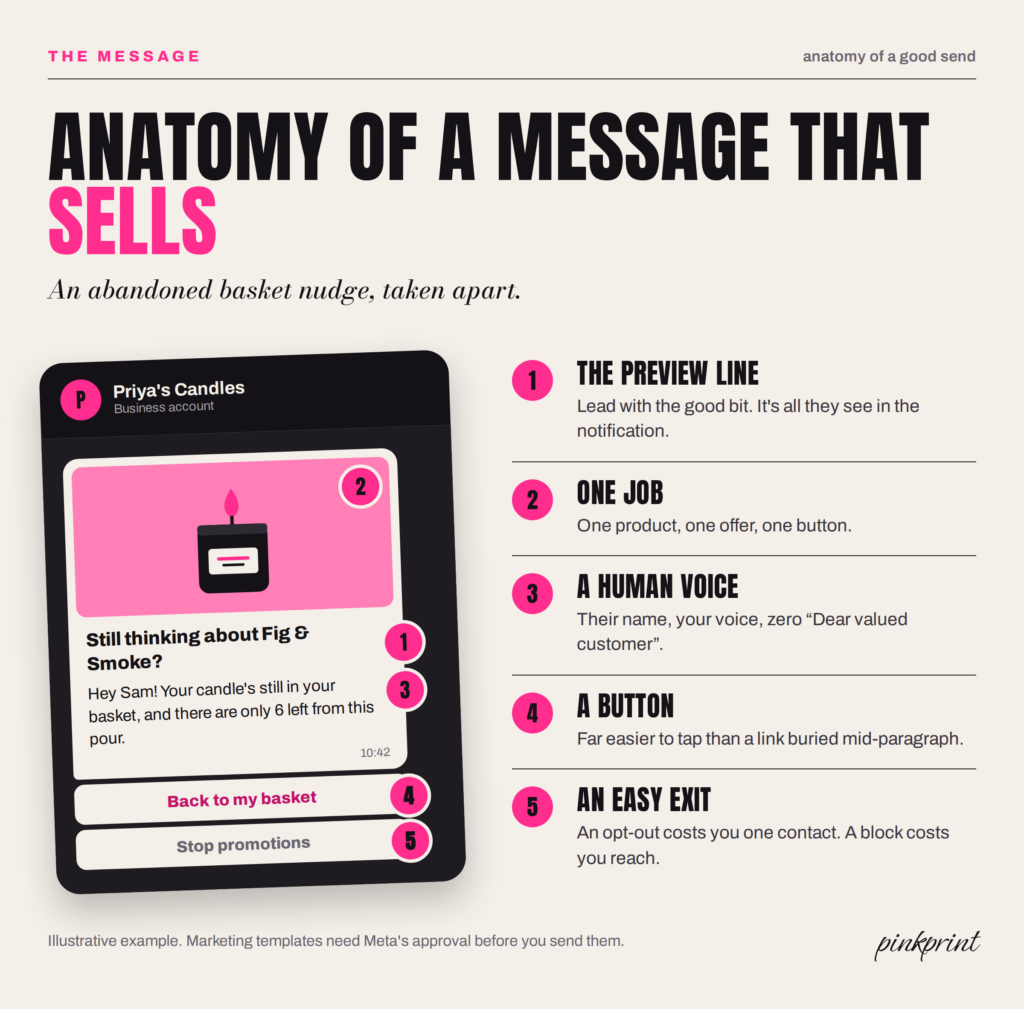
- Nail the preview. The first line shows up in the notification, so lead with the good bit.
- Give each message one job. One product, one offer, one button.
- Write like a person. Use your name. Use theirs. Contractions, emojis if they suit your brand, and zero “Dear valued customer” energy.
- Use buttons. A button is far easier to tap on a phone screen than a long link halfway through a paragraph.
- Keep it short. If it scrolls, it’s an email. Send an email.
How Often Should You Send WhatsApp Marketing Messages?
We need to talk about the ex.
You know the one. Goes quiet for months, then it’s “hey stranger 👀” at 1:47am. Then “u up?” Then, somehow, “saw this and thought of u” with a link to a video of a dog on a skateboard. Every message makes you like them a little less, until one night you mute them and go to sleep.
Don’t be the ex. On email, over-sending means people ignore you. On WhatsApp, people mute, block and report you, and Meta keeps score.
Meta caps how many marketing messages each person can receive across all businesses, and the cap moves per person, based on how often they read marketing messages and how busy their inbox already is with friends, family and brands. Hit it and your message fails (your provider will show error 131049), and Meta tells you to wait at least 24 hours before trying again. Translation: the less people engage with marketing messages, the fewer they get. Meta throttles boring brands.
Then there’s the slow leak. Chatarmin’s average opt-out was 0.34% per message. Tiny, right? Now do the maths. Send eight campaigns a month and you’ll lose about 2.7% of your list every month, which compounds to roughly 28% by the end of the year. Send two a month and you’ll lose about 8% a year. Same list. Same content. Very different outcome.
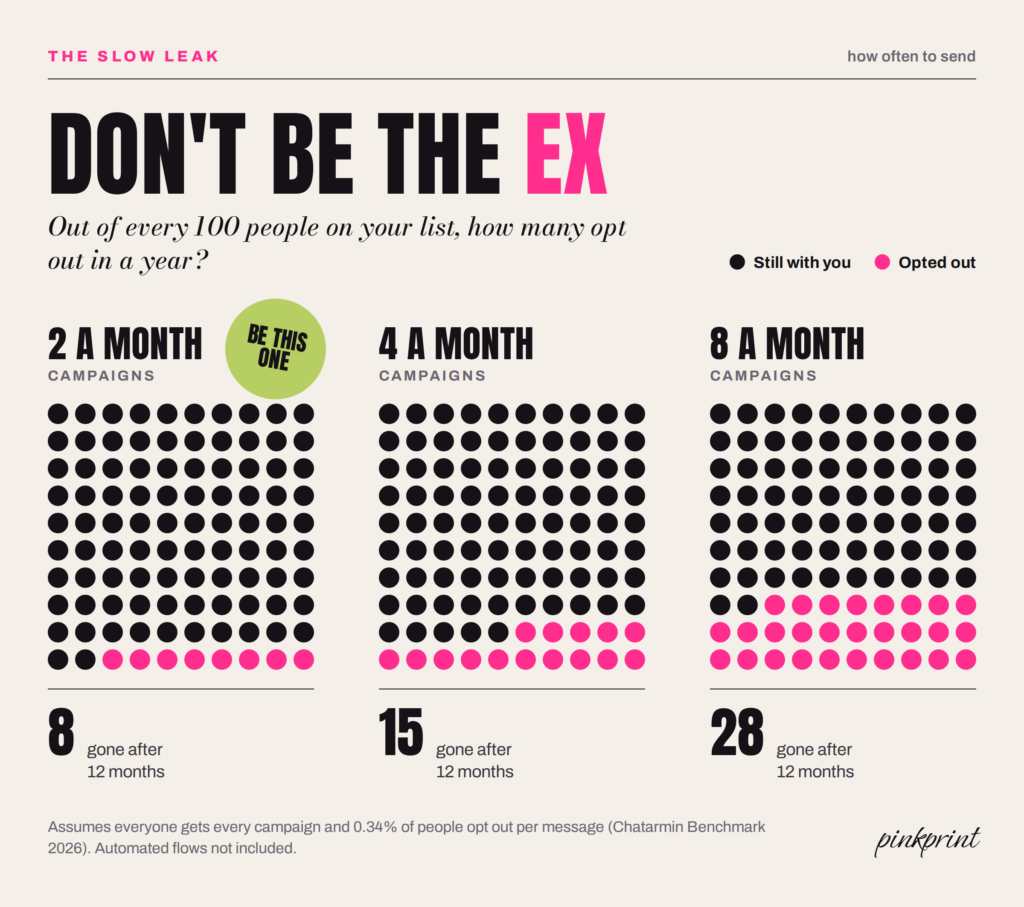
My starting point for most small brands: two to four campaigns a month, plus automated flows that only fire when someone does something (abandons a basket, places an order, goes quiet). Watch your block and opt-out rates, and back off the second they climb.
The one exception is November. Chatarmin’s brands sent about two-thirds more campaign messages than usual in Black Friday month and made 22% of their whole year’s campaign revenue in it. People expect to hear from you then. So if you’re reading this in autumn, start building your list this week, so you’ve got people to talk to when Black Friday lands.
WhatsApp Channels, Status Ads and Click-to-WhatsApp Ads
Everything so far happens in chats. WhatsApp also has a whole other tab, and it’s where Meta has started selling ads.
WhatsApp Channels
A Channel is a one-way feed that people choose to follow, a bit like an Instagram broadcast channel. You post updates, photos, polls and drops, and followers see them in the Updates tab. You don’t see their phone numbers, and they don’t see each other’s. Channels suit community-style content (behind the scenes, restock countdowns, a poll on the next scent) for people who want your news without their phone buzzing. You can’t personalise anything or trigger messages from a Channel, so think of it as a feeder for your opted-in list rather than a replacement.
Status Ads and Promoted Channels
In February 2026, WhatsApp rolled out ads in Status and Promoted Channels globally. Status ads sit between people’s Status updates (WhatsApp’s version of Stories), and Promoted Channels get a highlighted spot in the Channels directory. WhatsApp keeps ads inside the Updates tab, so personal chats stay ad-free. You buy them through Meta’s ads tools, and a Status ad can take people straight into a chat with you.
Click-to-WhatsApp Ads
These are Facebook and Instagram ads that open a WhatsApp chat instead of a landing page. They suit products people like to ask about before buying: furniture, skincare consultations, courses, bookings, anything bigger-ticket. Remember that free 72-hour window from earlier? This is how you get it. Someone taps, messages you, you reply within 24 hours, and for three days your messages cost nothing.

The trick is speed. A chat that sits unanswered for six hours feels worse than a landing page, because you’ve left someone hanging mid-conversation.
Using AI and Chatbots for WhatsApp Marketing
Yes, you can put AI on your WhatsApp. No, you can’t plug in a general chatbot and let it talk about anything.
Since 15 January 2026, Meta has banned general-purpose AI assistants from the WhatsApp Business Platform. Bots that do a specific business job (answering product questions, tracking orders, booking appointments, qualifying leads) are fine. A bot that’ll happily discuss the meaning of life with your customers is out.
Meta is also pushing its own option, the Business Agent. In the Business app it’s free to start. On the Platform, Meta has charged for it since 1 August 2026 at $2 per million tokens, which Meta estimates at roughly 4 to 5 US cents per message.
My rules for AI on WhatsApp:
- Say it’s a bot. People forgive a helpful bot. They don’t forgive feeling tricked.
- Give it a narrow job. Stock questions, delivery times, sizing, bookings.
- Hand off to a human fast. Complaints, custom orders and anyone typing in capitals go to a person.
- Keep it in your voice. Feed it your tone of voice guide, then read its replies for a week before you trust it alone.
Remember where it’s sitting: between Mum and the group chat. A stiff, robotic reply sticks out a mile in there.
How Jellycat Uses WhatsApp (and What You Can Steal)
Okay, I need to talk about Jellycat, because I’m a little bit obsessed with how they’ve set this up.
Quick refresher in case you’ve somehow dodged them: Jellycat makes the plush toys grown adults queue round the block for. They turned a corner of Selfridges into a Fish & Chips shop for soft toys, and the hype paid off in a big way. Their latest accounts show pre-tax profit up 98% to £240 million in 2025, on revenue of £450 million.
You’d expect a brand with that much hype to fire new drops at its fans on WhatsApp every other day. As far as I can tell, it doesn’t.
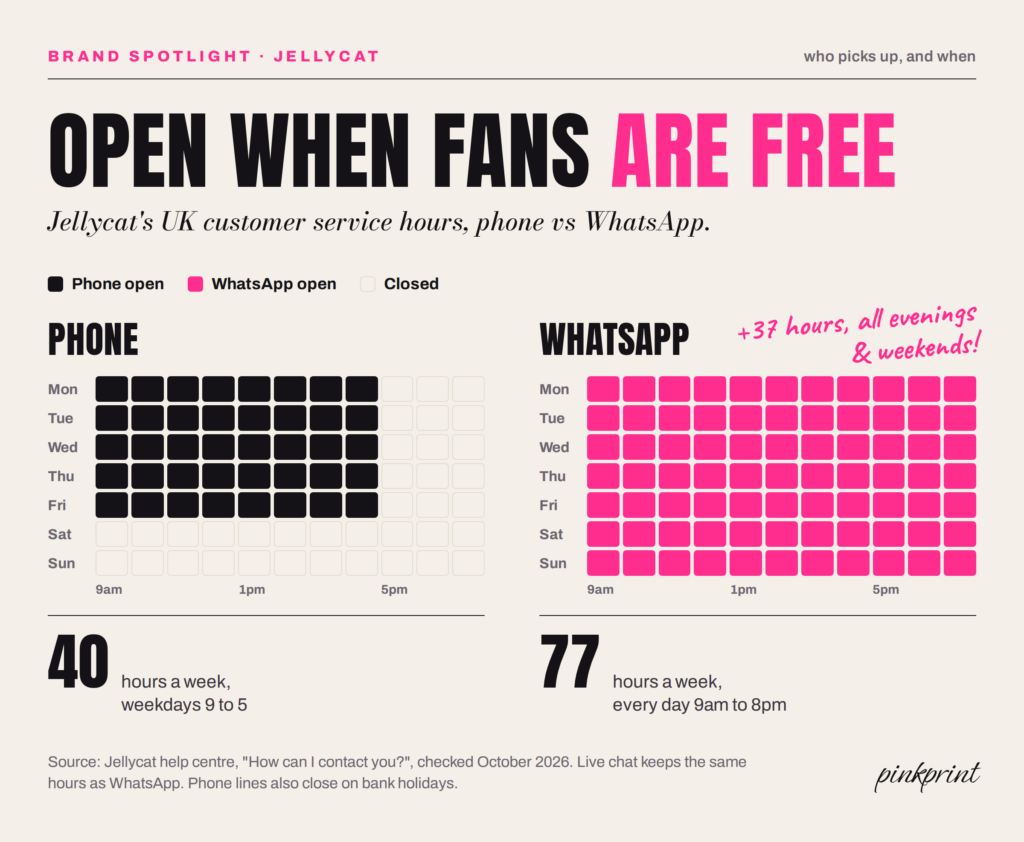
Here’s what you can see in public. Their help centre lists WhatsApp right next to phone, live chat and email, open 9am to 8pm UK time, seven days a week. Their UK privacy policy, meanwhile, names email, post and SMS as the channels it uses for marketing. WhatsApp isn’t on that list. The shouting happens on TikTok (2.3 million followers, according to that same profits report), Instagram (2.8 million), in shop windows and in the inbox. WhatsApp’s job is looking after people.
(I can’t see inside their WhatsApp inbox, so I’m not going to pretend I know what their replies sound like. What I can see is the set-up, and the set-up is the clever bit.)
What Jellycat Gets Right on WhatsApp
They’re open when fans are actually free. Their phone line runs Monday to Friday, 9 to 5. WhatsApp runs every day until 8pm. That’s 77 hours a week on WhatsApp against 40 on the phone, and every one of those extra 37 hours lands on an evening or a weekend. Picture it: it’s Sunday at 7pm, someone’s scrolling TikTok, spots a new bunny and wants to know if it’ll arrive before their niece’s birthday on Tuesday. The phone line went home on Friday. The WhatsApp chat is right there, in the app they’ve had open all day.
Each channel gets one job. TikTok and Instagram create the “I NEED that” moment. Email, post and SMS carry the marketing. WhatsApp handles “wait, can you help me with something?” Nobody’s phone buzzes with a WhatsApp promo they didn’t ask for, so Jellycat never goes near the mute button. They’re the opposite of the ex. (Told you that bit would come back.)
Fans start the chat. WhatsApp sits on their contact page, so a conversation opens when a fan messages first, and Jellycat replies to someone who already wants to hear from them. No consent headaches and no frequency caps to dodge.
Service is marketing when you sell collectables. That Sunday-night birthday question? A quick, friendly answer saves the sale, and the warm fuzzy feeling sticks to the brand. That’s marketing. It just doesn’t come with a discount code.
How to Copy Jellycat’s WhatsApp Playbook
You don’t need £450 million in revenue to do any of this. Here’s the small-business version:
- Put WhatsApp on your contact page with real hours. “Find us on WhatsApp, 9am to 8pm, every day” is clear and honest. A wa.me link takes two minutes to make.
- Match your hours to your customers, not your desk. Check when your DMs and orders actually come in. If it’s evenings, cover evenings, even if that means one focused hour after dinner with quick replies doing the heavy lifting.
- Give WhatsApp one job first. Start with service and earn trust in the chat. Later, add a “want first dibs on new drops?” button, so the people who love you can ask for more.
- Let the hype live somewhere louder. TikTok, Instagram and email can shout. WhatsApp should feel like texting a mate who works there.
- Budget for replies. On the Business Platform, every service reply costs about 1.5p to 2p in the UK from 1 October 2026. That adds up fast for any big brand running support on WhatsApp, and it’s one more reason to send one good reply instead of three “ok!”s.
How to Measure WhatsApp Marketing
Track these five, and ignore anyone who only brags about open rates:
- Read rate: read receipts divided by delivered messages. Chatarmin’s median brand hit 72%, so that’s your number to beat.
- Click rate: clicks divided by delivered messages. Around 12% is a solid campaign benchmark.
- Opt-out and block rate: anything creeping above Chatarmin’s 0.34% average per message is your cue to send less, or send better.
- Revenue per message: attributed revenue divided by messages sent. It’s the fairest way to compare WhatsApp with email and SMS.
- Reply rate: replies are the whole point of a two-way channel, and every reply opens a 24-hour window to keep talking.
Put UTM links on every button and give WhatsApp its own discount codes, so WhatsApp gets credit for the sales it drives (and doesn’t nick credit from your email).
A 30-Day Plan to Launch WhatsApp Marketing
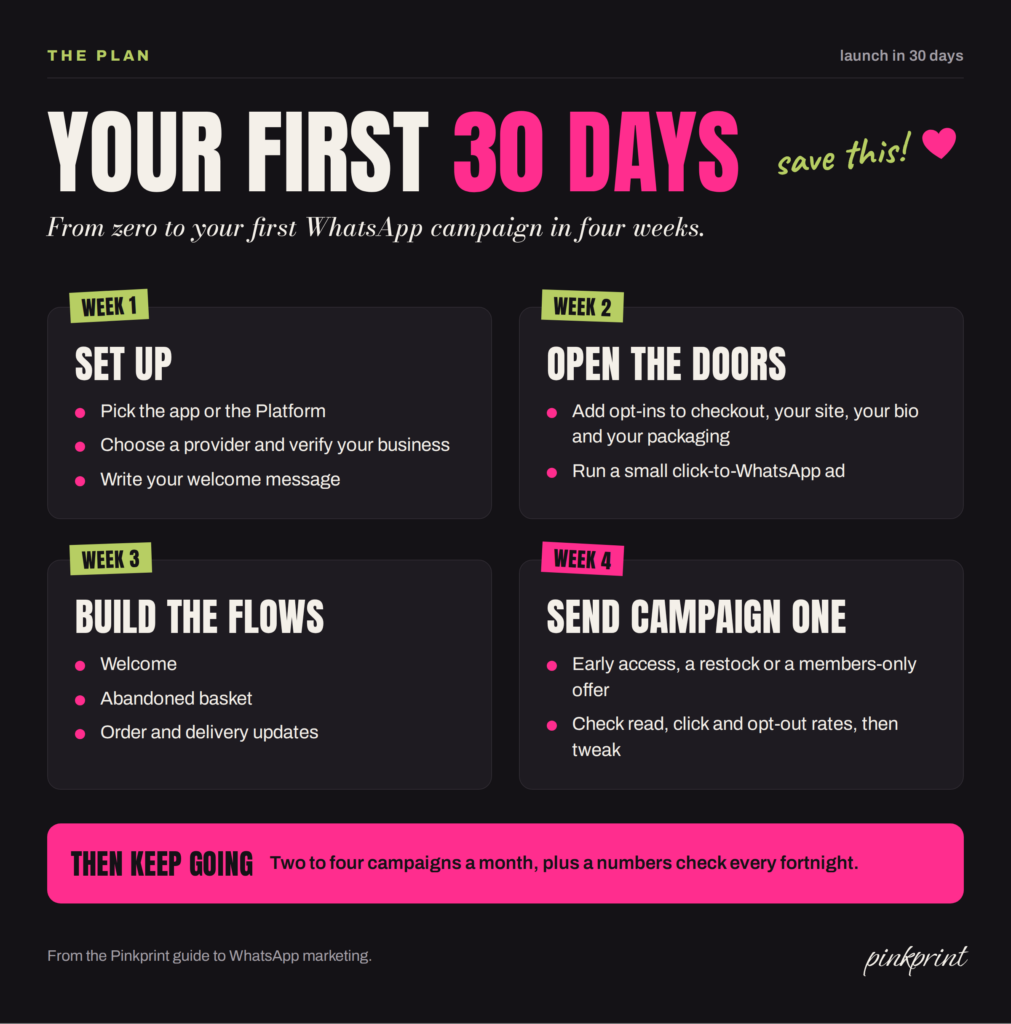
Week 1: Set up. Pick the app or the Platform to start your WhatsApp marketing. If it’s the Platform, choose a provider that plugs into your shop, verify your business and get your display name approved. Write your welcome message.
Week 2: Open the doors. Add opt-ins to your checkout, website, Instagram bio and packaging. Run a small click-to-WhatsApp ad to kickstart sign-ups.
Week 3: Build the flows. Welcome, abandoned basket and order updates first. They’ll run in the background from then on.
Week 4: Send your first campaign. Make it something people actually want: early access, a restock or a members-only offer. Then check your read, click and opt-out rates, and adjust.
After that: two to four campaigns a month, a quick numbers check every fortnight, and a list that grows every time someone buys.
Right, let’s go back to that chat list. Mum’s sent another voice note. The group chat’s hit 300 unread. Your best mate’s asking about Friday again.
WhatsApp gives you a seat in there. Earn it every single time: send things people asked for, make leaving easy, reply like a human, and don’t be the ex. Do that, and your customers won’t mute you. They’ll message you back.
FAQ: Using WhatsApp in Marketing
Is WhatsApp marketing legal in the UK?
Yes, with consent. The ICO applies PECR’s electronic mail rules to WhatsApp, so you need clear consent or the soft opt-in for existing customers, plus an easy opt-out in every message. Meta also requires opt-in under its own business messaging policy.
How much does WhatsApp marketing cost?
The WhatsApp Business app is free for one-to-one chats, and its broadcasts come with a free monthly allowance before you buy credits. On the Business Platform, Meta charges per delivered message: roughly 5p for a UK marketing message, and around 1.5p to 2p for utility messages and, from 1 October 2026, service replies. Your provider adds its own fees on top.
Can I message people who haven’t saved my number?
Yes, on both. The Business app’s business broadcasts can reach customers who haven’t saved your number, within your monthly allowance and credits, and the Business Platform can message anyone who has opted in. Either way, you need their consent first.
How many WhatsApp marketing messages should I send a month?
There’s no fixed number, but Meta caps how many marketing messages each person receives across all businesses. For most small brands, two to four campaigns a month plus behaviour-triggered flows is a sensible starting point.
What’s a good open rate for WhatsApp marketing?
Ignore the 98% claims. Chatarmin’s data from 382 brands puts the median brand at about 72% of delivered messages read, with around 12% clicks. If you’re near those numbers, you’re doing well.
What’s the difference between WhatsApp Channels and broadcasts?
A Channel is a one-way feed that anyone can follow, and you never see followers’ numbers. A broadcast (or a Platform campaign) lands in each person’s private chat, so you can personalise it, and they can reply. Use Channels for community and news, and your opted-in list for offers and sales.
Can I use ChatGPT on my WhatsApp Business account?
Not as a general chatbot. Since January 2026, Meta has banned general-purpose AI assistants on the Business Platform. AI that does a specific business task, like answering product questions or booking appointments, is still allowed, and Meta offers its own Business Agent.
Does Jellycat use WhatsApp for marketing?
Jellycat uses WhatsApp as a customer service channel, open 9am to 8pm UK time every day. Its UK privacy policy lists email, post and SMS as its marketing channels, so on WhatsApp the brand’s job is helping fans rather than broadcasting promos.
